pyyeti.dsp.windowends
- pyyeti.dsp.windowends(sig, portion=0.01, ends='front', axis=-1)[source]
Apply parts of a cosine window to the ends of a signal.
This is also called the “Tukey” window. The window values are computed from:
(1 - cos)/2.- Parameters:
sig (1d or 2d ndarray) – Vector or matrix; input time signal(s).
portion (scalar, optional) – If > 1, specifies the number of points to window at each end. If in (0, 1], specifies the fraction of signal to window at each end:
npts = int(portion * np.size(sig, axis)).ends (string, optional) – Specify which ends of signal to operate on:
ends
Action
‘none’
no windowing (no change to signal)
‘front’
window front end only
‘back’
window back end only
‘both’
window both ends
axis (int, optional) – Axis along which to operate.
- Returns:
Returns the windowed signal(s); same size as the input.
Notes
The minimum number of points that can be windowed is 3. Therefore, portion is internally adjusted to 3 if the input value is (or the computed value turns out to be) less than 3.
Examples
>>> from pyyeti import dsp
>>> import numpy as np
>>> np.set_printoptions(precision=2, suppress=True)
>>> dsp.windowends(np.ones(8), 4)
array([ 0.  ,  0.25,  0.75,  1.  ,  1.  ,  1.  ,  1.  ,  1.  ])
>>> dsp.windowends(np.ones(8), .7, ends='back')
array([ 1.  ,  1.  ,  1.  ,  1.  ,  0.85,  0.5 ,  0.15,  0.  ])
>>> dsp.windowends(np.ones(8), .5, ends='both')
array([ 0.  ,  0.25,  0.75,  1.  ,  1.  ,  0.75,  0.25,  0.  ])
>>> import matplotlib.pyplot as plt
>>> _ = plt.figure('Example', figsize=[8, 3], clear=True,
...                layout='constrained')
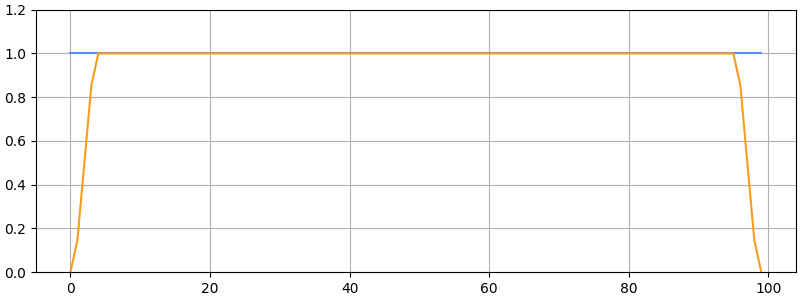
>>> sig = np.ones(100)
>>> wesig = dsp.windowends(sig, 5, ends='both')
>>> _ = plt.plot(sig, label='Original')
>>> _ = plt.plot(wesig, label='windowends (ends="both")')
>>> _ = plt.ylim(0, 1.2)