pyyeti.dsp.despike
- pyyeti.dsp.despike(x, n, sigma=8.0, maxiter=-1, threshold_sigma=2.0, threshold_value=None, exclude_point='first', **kwargs)[source]
Delete outlier data points from signal
- Parameters:
x (1d array_like) – Signal to de-spike.
n (odd integer) – Number of points for moving average; if even, it is reset to
n+1. If greater than the dimension of x, it is reset to the dimension or 1 less.sigma (real scalar; optional) – Number of standard deviations beyond which a point is considered an outlier. The default value is quite high; this is possible because the point itself is excluded from the calculations.
maxiter (integer; optional) – Maximum number of iterations of outlier removal allowed. If exclude_point is ‘first’, only the last spike is removed on each iteration; if it is ‘last’, only the first spike is removed on each iteration. It is done this way because removing a spike can expose other points as spikes (but didn’t appear to be because the removed spike was present). If <= 0, there is no set limit and the looping will stop when no more outliers are detected. Routine will always run at least 1 loop (setting maxiter to 0 is the same as setting it to 1).
threshold_sigma (scalar; optional) – Number of standard deviations below which all data is kept. This standard deviation is of the entire input signal minus the moving average (using a window of n size). This value exists to avoid deleting small deviations such as bit toggles. Set to 0.0 to not use a threshold. threshold_value overrides threshold_sigma if it is not None.
threshold_value (scalar or None; optional) – Optional method for specifying a minimum threshold. If not None, this scalar is used as an absolute minimum deviation from the moving average for a value to be considered a spike. Overrides threshold_sigma. Set to 0.0 to not use a threshold.
exclude_point (string or int or None; optional) – Defines where, within each window, the point that is being considered as a potential outlier is. For example, ‘first’ compares the first point in each window the rest in that window to test if it is an outlier. This option is passed directly to
exclusive_sgfilter(). If integer, it must be in [0, n), specifying the point to exclude. If string, it must be ‘first’, ‘middle’, or ‘last’ (which is the same as0,n // 2, andn-1, respectively). If None, the point will be in the middle of the window and will not be excluded from the statistics (this is not recommended).**kwargs (other args are ignored) – This is here to accommodate
fixtime().
- Returns:
A SimpleNamespace with the members
x (1d ndarray) – Despiked version of input x. Will be shorter than input x if any spikes were deleted; otherwise, it will equal input x.
pv (bool 1d ndarray; same size as input x) – Has True where an outlier was detected
hilim (1d ndarray; same size as input x) – This is the upper limit:
mean + sigma*stdlolim (1d ndarray; same size as input x) – This is the lower limit:
mean - sigma*stdniter (integer) – Number of iterations executed
Notes
Uses
exclusive_sgfilter()to exclude the point being tested from the moving average and the moving standard deviation calculations. Each point is tested. The points near the ends of the signal may not be at the requested position in the window (seeexclusive_sgfilter()for more information on this).To not use a threshold, set threshold_sigma to 0.0 (or set threshold_value to 0.0).
Note
If you plan to use both
fixtime()anddespike(), it is recommended that you letfixtime()calldespike()(via the delspikes option) instead of calling it directly. This is preferable because the ideal time to rundespike()is in the middle offixtime(): after drop-outs have been deleted but before gaps are filled.Examples
Compare exclude_point ‘first’ and ‘middle’ options. An explanation follows:
>>> import numpy as np
>>> from pyyeti import dsp
>>> x = [1, 1, 1, 1, 5, 5, 1, 1, 1, 1]
>>> s = dsp.despike(x, n=5, exclude_point='first')
>>> s.x
array([1, 1, 1, 1, 1, 1, 1, 1])
>>> s = dsp.despike(x, n=5, exclude_point='middle')
>>> s.x
array([1, 1, 1, 1, 5, 5, 1, 1, 1, 1])
The two 5 points get deleted when using ‘first’ but not when using ‘middle’. This is logical because, when using ‘first’, the second 5 is compared to following four 1 values (the window is
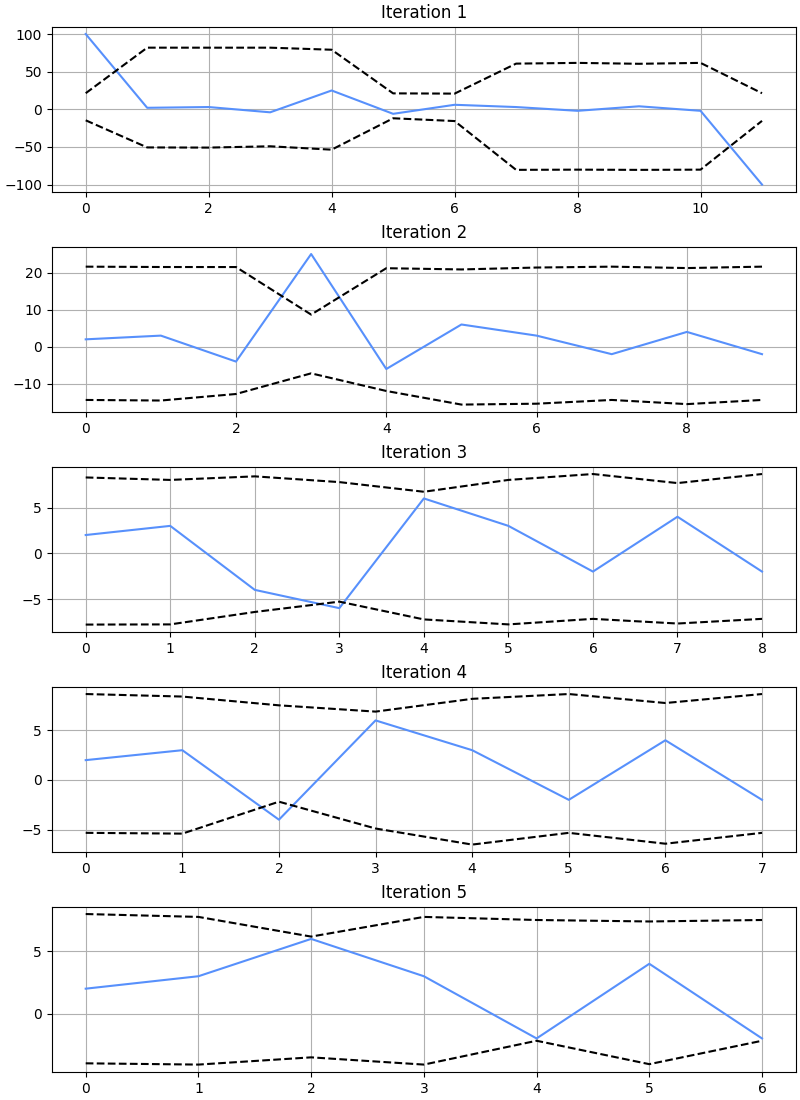
[5, 1, 1, 1, 1]. The second loop then catches the other 5. But when ‘middle’ is used, the window for the first 5 is[1, 1, 5, 5, 1]and the window for the second 5 is[1, 5, 5, 1, 1]. For both points, the other 5 in the window prevents the center 5 from being considered an outlier.For another example, make up some data and, with carefully chosen inputs, demonstrate how the routine runs by plotting one iteration at a time:
>>> import matplotlib.pyplot as plt
>>> np.set_printoptions(linewidth=65)
>>> x = [100, 2, 3, -4, 25, -6, 6, 3, -2, 4, -2, -100]
>>> _ = plt.figure('Example', figsize=(8, 11), clear=True,
...                layout='constrained')
>>> for i in range(5):
...     s = dsp.despike(x, n=9, sigma=2, maxiter=1,
...                     threshold_sigma=0.1,
...                     exclude_point='middle')
...     _ = plt.subplot(5, 1, i+1)
...     _ = plt.plot(x)
...     _ = plt.plot(s.hilim, 'k--')
...     _ = plt.plot(s.lolim, 'k--')
...     _ = plt.title(f'Iteration {i+1}')
...     x = s.x
>>> s.x
array([ 2,  3,  6,  3, -2,  4, -2])
Run all iterations at once to see what
s.pvlooks like:>>> x = [100, 2, 3, -4, 25, -6, 6, 3, -2, 4, -2, -100] >>> s = dsp.despike(x, n=9, sigma=2, ... threshold_sigma=0.1, ... exclude_point='middle') >>> s.x array([ 2, 3, 6, 3, -2, 4, -2]) >>> s.pv array([ True, False, False, True, True, True, False, False, False, False, False, True], dtype=bool)